Your day. At your pace.

Make room
for your thing.

The chapter. The side project. The work you care about.
A little plan and a little focus can be your place to start.

Your focus timer, daily plan and personal time journal.
All together in Tomato. All yours to make your own.

Free on your device. No account. No subscription.

A little less rush.
A little more you.
Brave Beaver takes a peaceful moment, sitting cross-legged with his eyes closed.
Tomato focus timer in the Sage palette.
A moment for what matters.
Premium features. No subscription. No project or task quotas Your work stays yours

Start small. See yourself grow.

From “where do I start?”
to “I’m on it.”

A simple timer when you begin. Rich statistics and timesheets when you look back.
Make a little room today. See what it becomes.

01 / MAKE A START

One thing.
Your full attention.

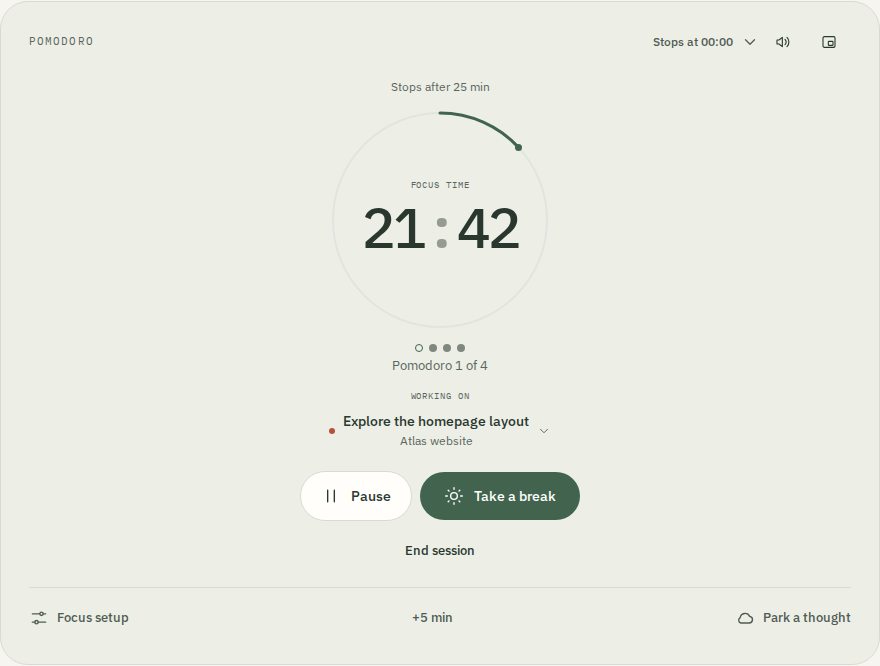
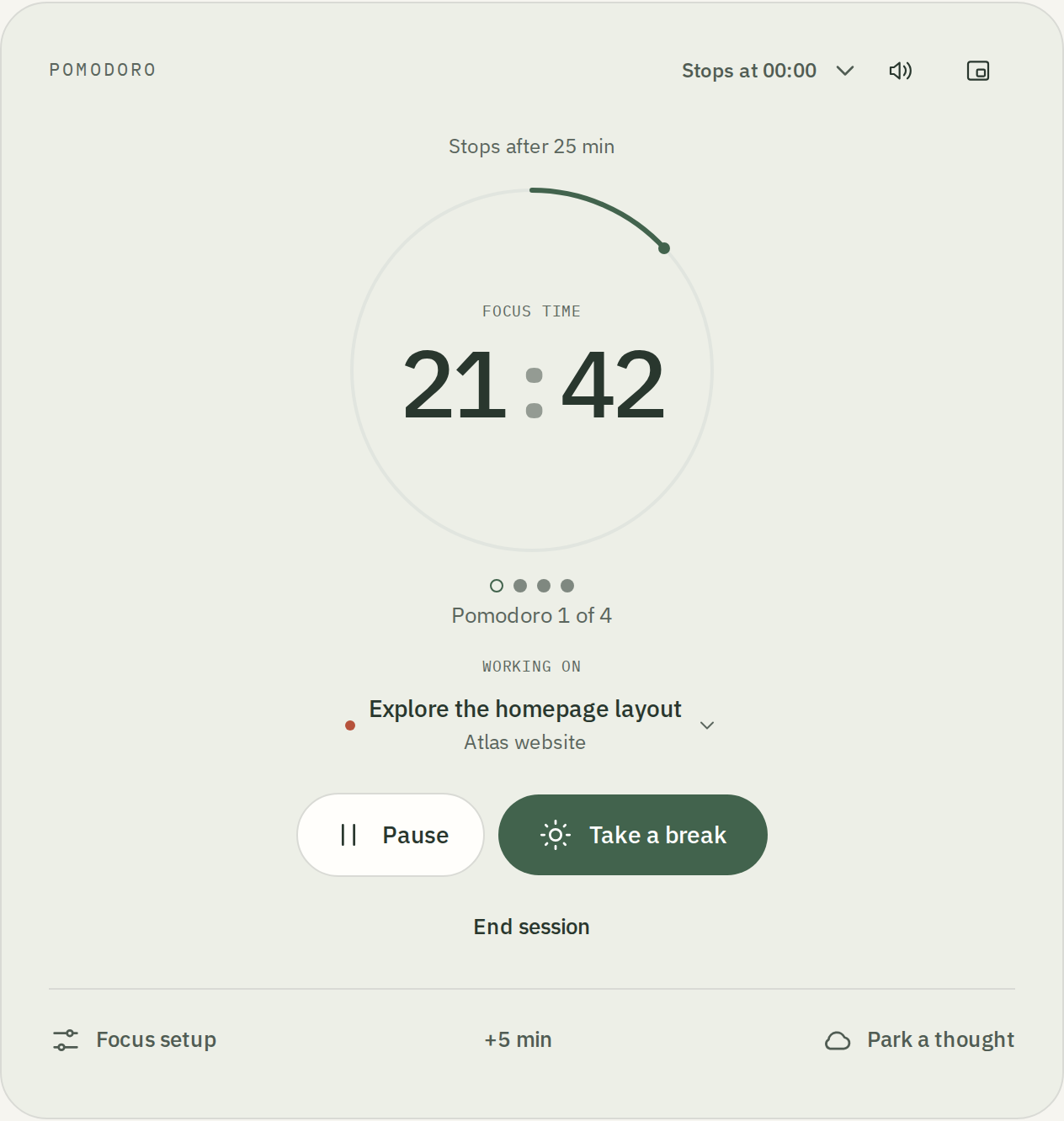
Pick what matters and press play. That’s your way in. Behind that simple timer, Tomato keeps a record of the time you give your work.

Set your own pace, take a break, start again. You don’t need to have the whole day figured out.

Tomato timer with the current task and focus controls.
02 / GET TO KNOW YOURSELF

Small sessions.
A bigger picture.

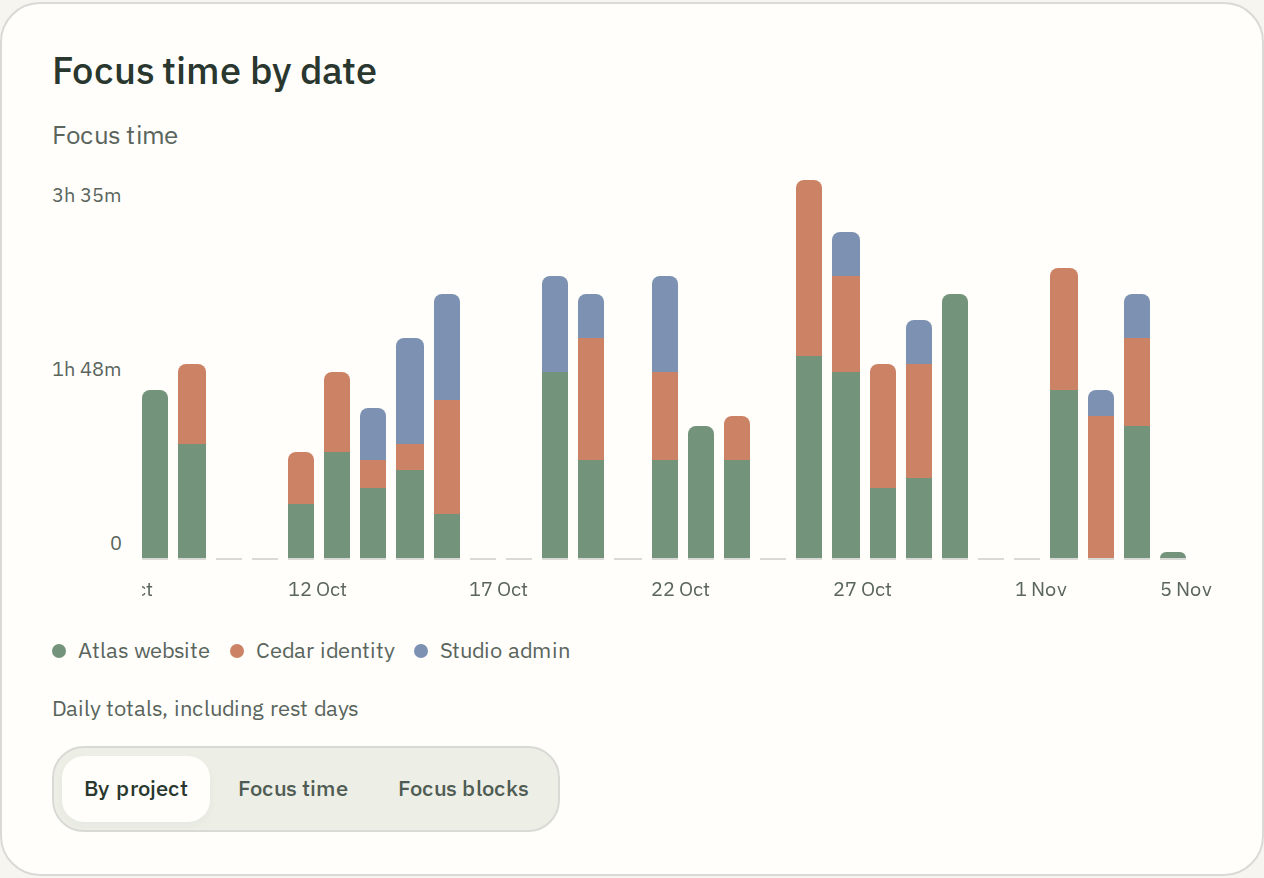
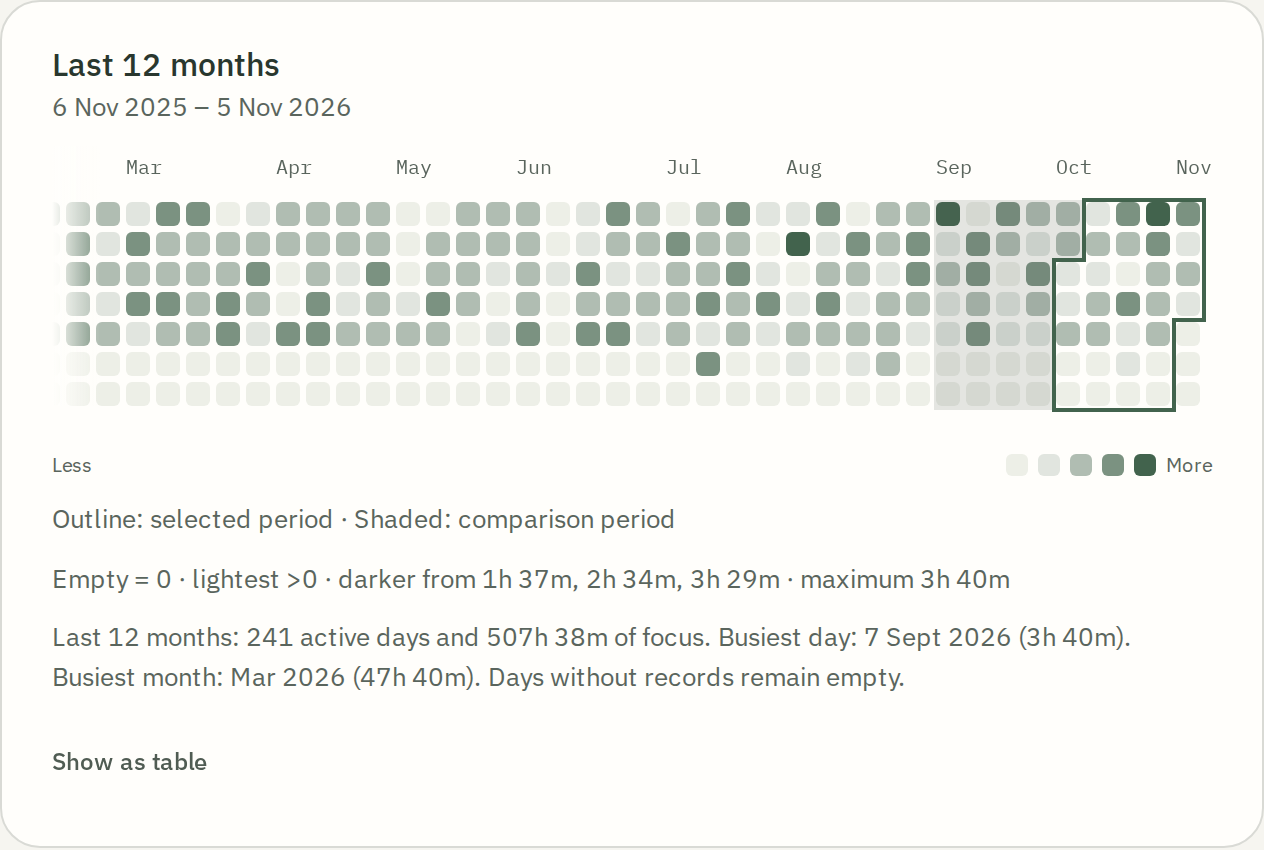
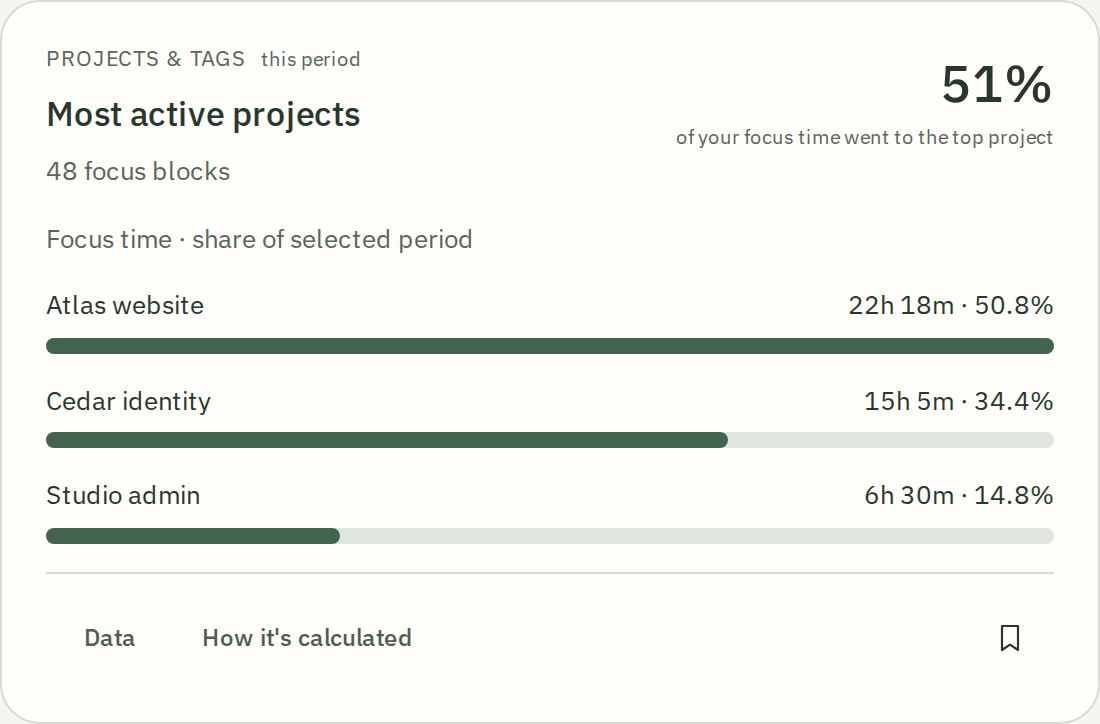
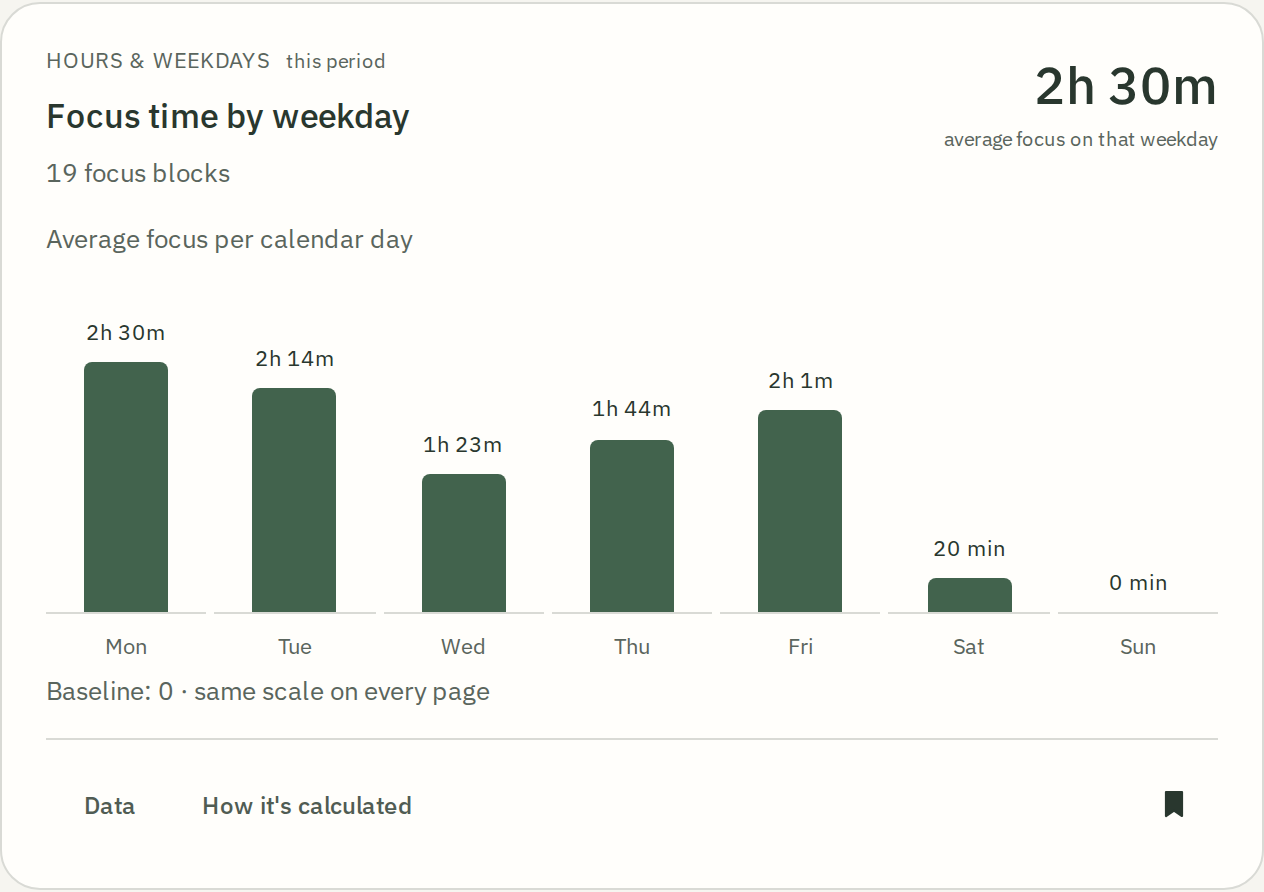
Where did your week go? Now you can see. Explore your focus by project, day and time. Look for patterns worth keeping — and room to try something different.

Daily detail. A whole year at a glance. A record of showing up for the things you care about.

Focus time by date, broken down by project.
A year of focus sessions in Tomato’s activity calendar.
03 / LET YOUR WORK SPEAK

“What did I do?”
Here’s your answer.

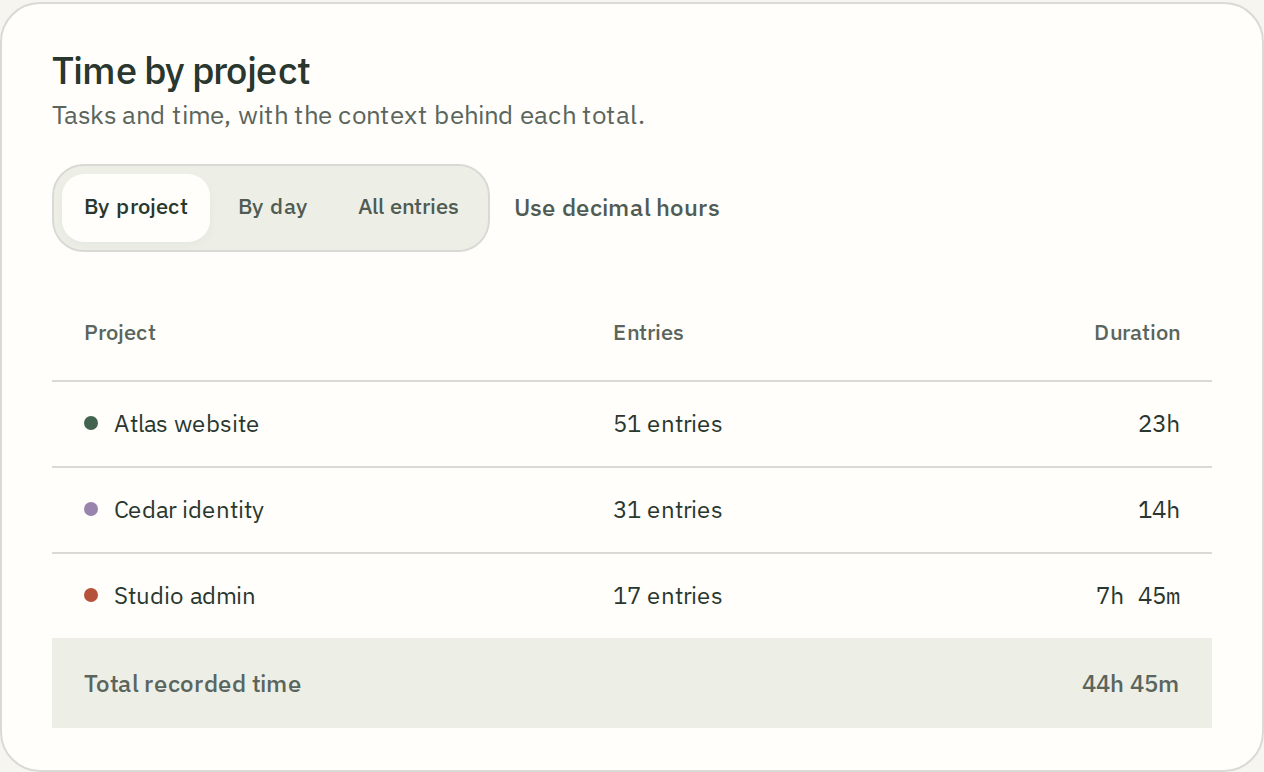
Your sessions become a timesheet. See the time behind each project, share a clear report, or take your records into the tools you already use.

  • Break it down by project, day or entry
  • Export your sessions as CSV
  • Save a PDF report from the web
Open a sample report
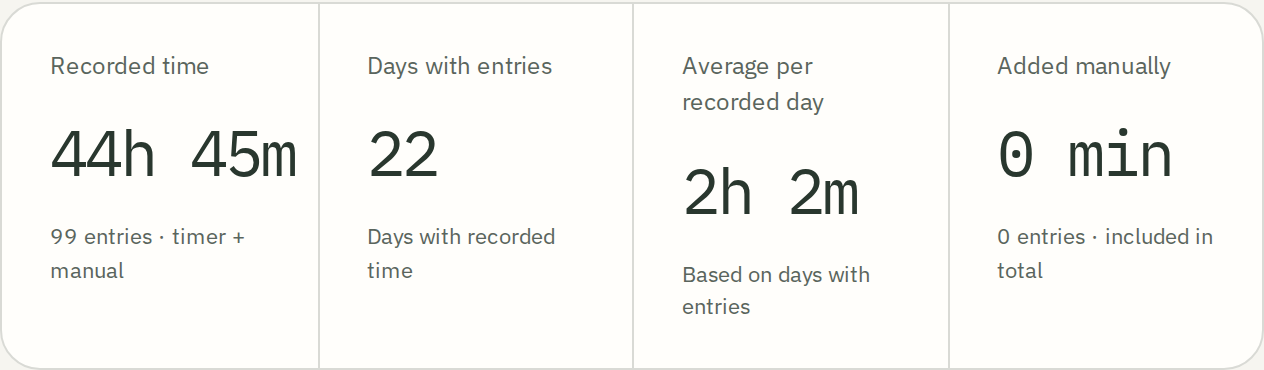
Tomato timesheet: 44 hours 45 minutes across three projects.
Timesheet with project names, entry counts and recorded duration.

Screens from Tomato, with example projects. Tap any screen to enlarge.

Premium features. Without the subscription.

There’s a lot to love
behind the timer.

A rhythm you chose.
A thought you didn’t lose.
A day with room for your kind of work.

Find your rhythm.
Then make it better.

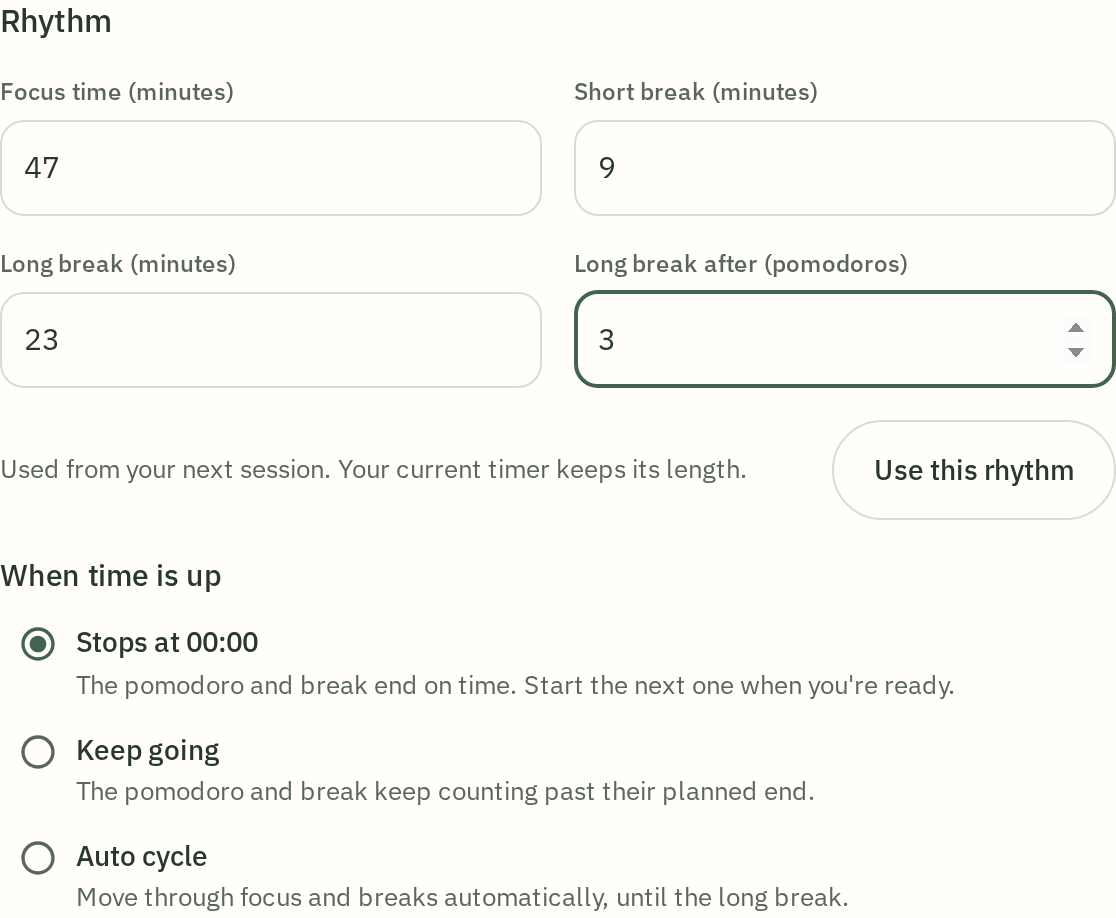
47 minutes of focus? Nine minutes off? A longer break after three sessions? Try it. Change it. Find the rhythm that fits you.

Choose focus and break lengths, the number of intervals, and what happens at zero. Stop, keep counting, cycle automatically — or go open-ended with Flow.

Custom rhythm: 47-minute focus, 9-minute short break, 23-minute long break after three intervals.

A little structure.
A lot of freedom.

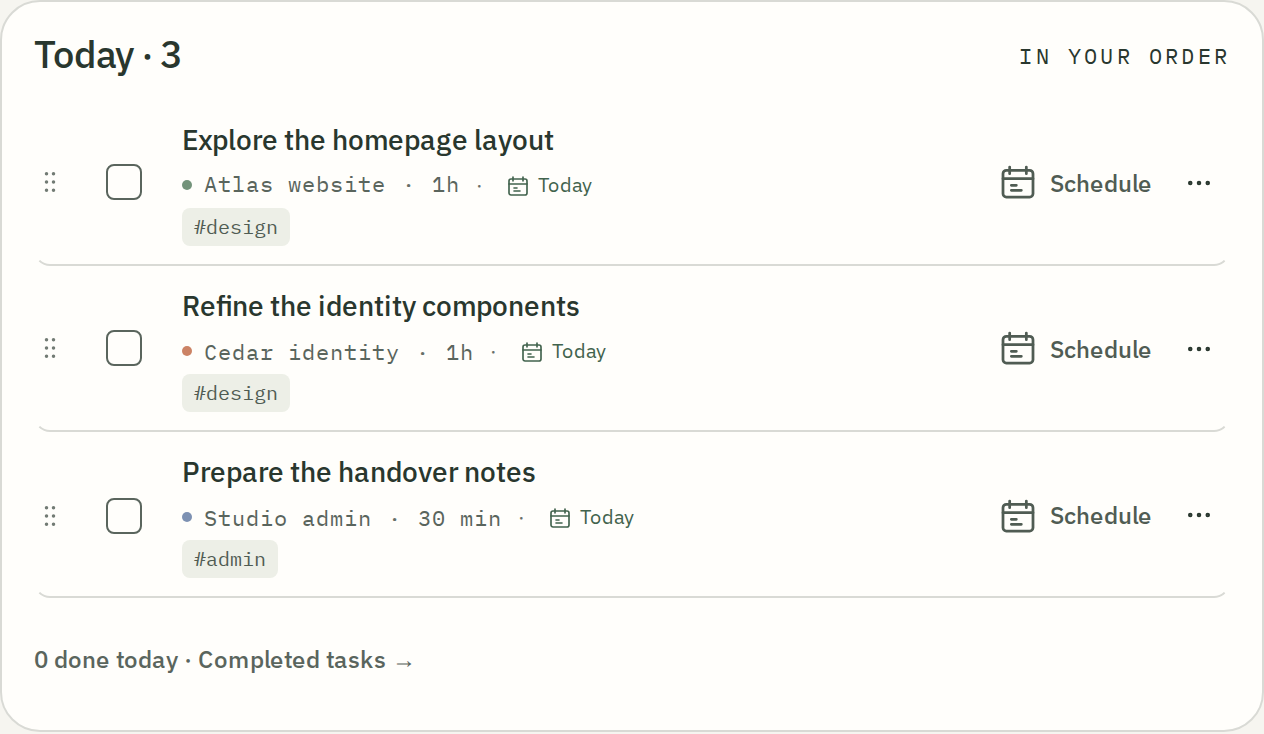
Bring your next steps into one place. Projects, tags, estimates and recurring tasks keep your work within reach.

No plan limits on projects, tasks or tags. Your plans can grow without an upgrade.

Today’s plan with three tasks, projects, tags and time estimates.

“Oh, and…”
Keep the thought.

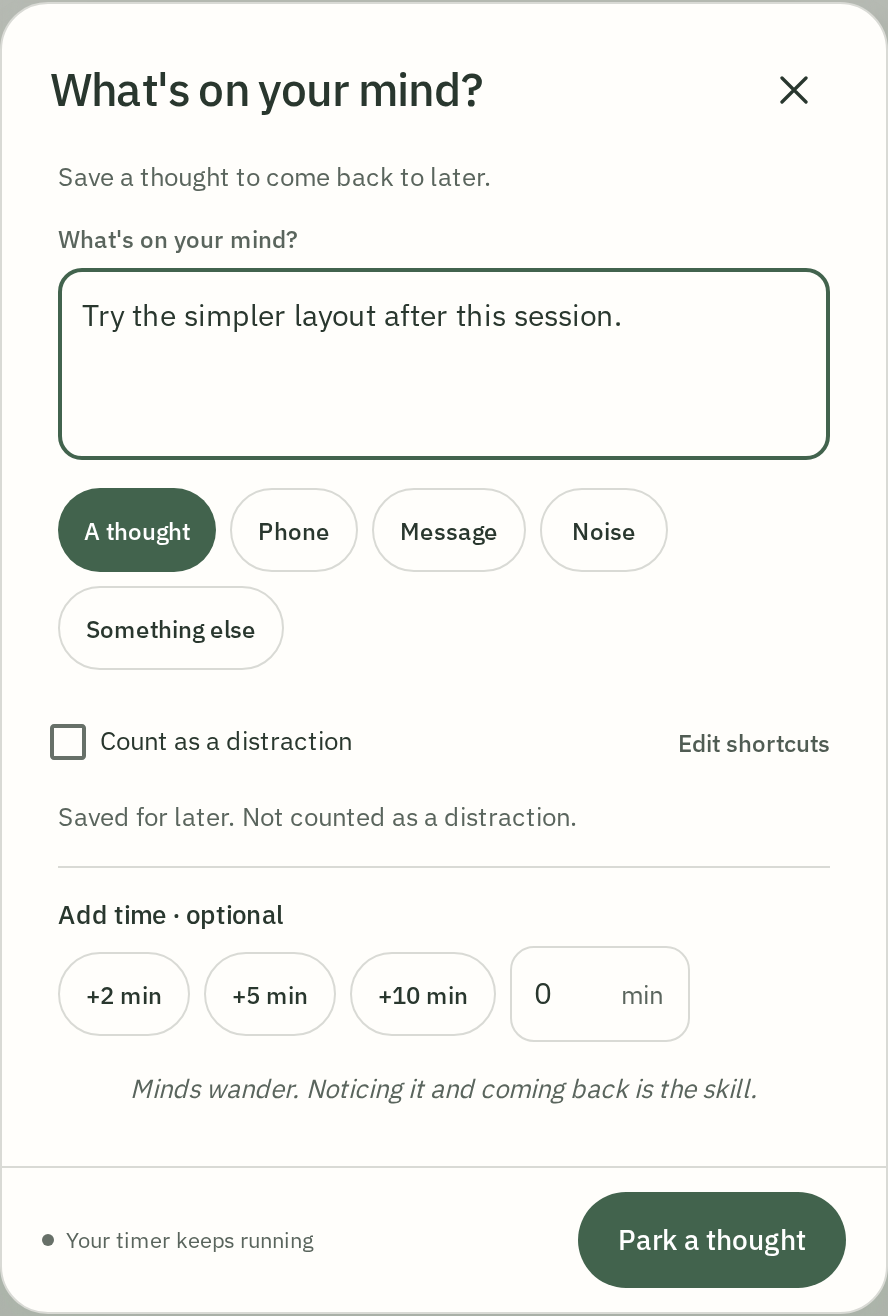
That idea that arrives halfway through a session? Give it a place to land. Park a thought without leaving your timer, then come back to it when you’re ready.

One less thing to hold in your head while you do your thing.

A thought captured alongside the active Tomato focus session.

Your questions.
Your kind of insight.

Go beyond a single total. Explore your history, choose the views that matter to you and save them to your own dashboard.

Less guessing about your time. More to learn from the work you’ve already done.

An insight into recorded focus time in Tomato Explore.
A saved focus insight on a personal Tomato dashboard.

Good on its own.
Great with your tools.

Your assistant through MCP. Your scripts through the API. Your automations through webhooks. Included from the start; online usage uses prepaid chips.

Meet the connections
tomato
MCPYour assistantAPIYour scriptsWebhooksYour automations

Room to grow, without a bigger plan

Your next project.
No upgrade required.

Projects, tasks, tags, colours, reports and connections. Tomato gives you the tools without Free/Premium quotas on your work. Compare the features and the limits — not just the price.

What is included, and what costs extra
The things you’ll useTomatoFocus, plan & reflectPomofocusA simple web timerForestGrow a forest as you focusSessionFocus & reflection on AppleTickTickTasks, calendar & habits
Your own focus lengthIncludedIncludedIncludedProAvailableTier not specified
Projects / listsNo plan limitPremiumNot listedCategoriesDifferent structure9 lists free299 with Premium
TasksNo plan limitIncludedNot listedToday planningEarly preview99 per list free999 with Premium
TagsNo plan limitNot includedProjects onlyCustom tags: PlusNot listedIncluded
A longer view of your timeIncludedFull local historyYearly: PremiumShorter reports freeAnalytics: PlusBasic tracking freeFull history: Pro2 days freeFull stats: PremiumBasic stats free
Export your sessions to CSVIncludedPremiumNot listedProNot listed
Make the look your ownIncluded6 palettes + customIncludedTimer colours + dark modeTree speciesSome exclusive to PlusDark mode: ProMore themes: PremiumBasic themes free
API accessIncludedPrepaid online usageNot includedWebhooks onlyNot listedAutomation: ProNo public API documentedOpen APIPlan terms not listed
WebhooksIncludedPrepaid online usagePremiumNot listedNot listedNot listed
Connect an assistant via MCPIncludedPrepaid online usageNot includedNot listedNot listedIncluded
Sync between devicesIncludedPrepaid online usageIncludedFree accountIncludedAccount syncProIncluded
Block distracting appsNot includedNot includedIncludedCustom allowlist: PlusProPlatform dependentNot listed

Free Paid / partly paid Included · online usage paid separately“Not listed” means the official page does not confirm it.

Sources, platform differences & what the table covers

Checked 2026-11-05. This is a feature comparison, not a ranking. Free means included without a paid upgrade on the stated platform. A paid label may cover a richer version of a free feature. Not listed is not a claim that a feature does not exist. Offers can change.

Pomofocus. Projects, yearly reports, CSV, Todoist and webhooks are Premium. Daily, weekly and monthly reports, colour themes and account sync are free. Tags, a public API, MCP and app blocking were not found in the app or its guide (checked in a free account on 5 November 2026). Features & Premium · Settings & account (checked 5 Nov 2026)

Forest. The table reflects the current Free / Plus offer for new mobile users. Existing Pro purchases retain their benefits. Species and tree rewards are different from full app colour palettes. Blocking and group focus are strengths of Forest. Cross-platform account sync is listed as a general feature, not as Plus. The official full comparison lists no projects, tasks, CSV export, API, webhooks or MCP; the mobile app itself was not checked. Free vs Plus

Session. macOS, iOS and iPadOS. Pro adds custom durations, full history, dark mode, sync and automation. CSV is documented as Pro in its changelog. Session uses intentions and categories rather than the same task/project structure as Tomato. The changelog describes a Today-only task planner as an early preview; it is not equated to a full project planner. Automation (AppleScript, Apple Shortcuts) is Pro; the docs describe a URL scheme but no public API, webhooks or MCP, and tags are not mentioned (docs only, no Apple device). Plans · CSV export · Getting started

TickTick. A broader planning suite: calendar and habit tools go beyond Tomato. Free has 9 lists and 99 tasks per list, tags, recurring tasks, cross-platform sync and MCP. Statistics and themes are basic on Free and expanded on Premium. Focus-session CSV is not confirmed; account backup is a different feature. Premium still caps lists at 299 and tasks/notes at 999 per list. Tag quantity and API request allowance are not specified in the reviewed public comparison. The Open API now covers tasks, focus records and habits. The help centre does not state a tier for custom focus length; Strict Mode reduces phone pickups and is not documented as app blocking. Free vs Premium · Focus tools · Focus duration · Open API

Tomato. Local tools are free. Sync, API and MCP use prepaid online services. PDF reports use the web print view. No plan limits means no Free/Premium quotas on the number of projects, tasks or tags. Online usage is prepaid and remains subject to service terms. The browser needs an initial online load and a cached app for offline use. Tomato does not block other apps or provide a shared focus room.

A small app. A fair deal.

Keep your focus.
Skip the subscription.

Your timer, plans, colours, statistics and reports are free on your device. Online services are there when you want them.

Make yourself at home
On your device$0

All local features.
No account needed.

Optional online account1¢/ day

30¢ for 30 days.
One prepaid Fair Ninja wallet.

The daily server maintenance cost covers online usage up to the same amount. Extra usage costs extra. Top-ups start at $5; you choose when to buy. Service details

A little maths. A lot left over.

What stays in your pocket?

Move the slider. See the cost — and what you could save with Tomato.

1 month

USD · 30-day months · online baseline usage for Tomato; whole paid billing periods for other apps. How we calculate this.

TOMATO / ONLINE SERVICES

$0.30

30¢ × 1 month · baseline service usage

$5 goes a long way.
500 days of baseline online services.
About 16 months, from one top-up.

Of a $5 top-up, $4.70 would remain after this period.

Same months. Different price tags.

Published paid options, compared with Tomato’s selected usage. Many apps also have free versions; check the features and scope alongside each price.

Paid options · 1 month · USD · checked 2026-11-05
App / scopeTheir totalYour savingHow long it covers
Pomofocus PremiumTimer + tasks$3.001 × $3.00 (monthly)$2.70 savedwith Tomato1 month coveredFree version available
Offer & source

Pomofocus Premium: $3/month, $18/year or $54 lifetime.

Projects, yearly reports, CSV and integrations; free timer and shorter reports remain available.

Official price
Focus To-DoTimer + tasks$3.991 × $3.99 (3-month)$3.69 savedwith Tomato3 months coveredFree version available
Offer & source

Focus To-Do: $3.99 for 3 months or $11.99 lifetime.

US store prices. The public listing does not clearly separate every Premium feature. A $1.99 "Focus To-Do Premium" purchase without a stated period is excluded.

Official price
TickTick PremiumWider toolkit$4.991 × $4.99 (monthly)$4.69 savedwith Tomato1 month coveredFree version available
Offer & source

TickTick Premium: $4.99/month or $49.99/year.

A full task, calendar and habit suite with a focus timer. Its free plan also includes a timer and sync.

Official price · Details
Session ProTimer + blocking$4.991 × $4.99 (monthly)$4.69 savedwith Tomato1 month coveredFree version available
Offer & source

Session Pro: $4.99/month or $39.99/year.

Apple devices. Pro adds history, custom durations, sync, Mac blocking and automation.

Official price
Flow ProTimer + blocking$2.991 × $2.99 (monthly)$2.69 savedwith Tomato1 month coveredFree version available
Offer & source

Flow Pro: $2.99/month, $17.99/year or $39.99 lifetime.

Apple devices. Free statistics sync already exists; Pro adds timer sync, custom controls, blocking and export.

Official price · Details
FocusCommit PremiumTimer + tasks$1.991 × $1.99 (monthly)$1.69 savedwith Tomato1 month coveredFree version available
Offer & source

FocusCommit Premium: $1.99/month, $14.99/year or $29.99 lifetime.

Monthly purchase is in-app. Premium adds tasks, projects, Kanban, detailed statistics and connections.

Official price
Be Focused ProTimer + tasks$2.991 × $2.99 (monthly)$2.69 savedwith Tomato1 month coveredFree version available
Offer & source

Be Focused Pro: $2.99/month, $19.99/year or $39.99 lifetime.

Current universal app for iPhone, iPad and Mac. Not the separate legacy Mac-only paid app.

Official price
Focusmo ProTimer + planning$4.991 × $4.99 (monthly)$4.69 savedwith Tomato1 month coveredFree version available
Offer & source

Focusmo Pro: $4.99/month, $39.99/year or $99 lifetime.

Mac. Pro adds history, calendar tools, custom rhythms and MCP; task-manager integrations are also in the free plan.

Official price
Pomo PremiumTimer + blocking$1.991 × $1.99 (monthly)$1.69 savedwith Tomato1 month coveredFree: 4 pomodoros/day
Offer & source

Pomo Premium: $1.99/month, $9.99/year or $15.99 lifetime.

iPhone. Paid plans add unlimited pomodoros, blocking, iCloud sync and achievements.

Official price
Pomodorome ProTimer + tasks$5.00One-time purchase$4.70 savedwith TomatoLifetime · one paymentFree version available
Offer & source

Pomodorome Pro: $5 once.

Mac and iPhone. One-time Pro purchase adds iCloud sync, advanced statistics, export and projects; region may affect price.

Official price
tudy ProWider toolkit$3.991 × $3.99 (monthly)$3.69 savedwith Tomato1 month coveredFree version available
Offer & source

tudy Pro: $3.99/month or $29.99/year.

Study toolkit with subjects, notes and flashcards. Its unlimited timer is free; advanced focus statistics are Pro.

Official price
Focus Bear ProWider toolkit$9.991 × $9.99 (monthly)$9.69 savedwith Tomato1 month coveredFree Essentials plan
Offer & source

Focus Bear Pro advertises $9.99/month.

Blocking, routines, music and meeting detection. The pricing page says $9.99; terms round the monthly price to $10. Billing is monthly; the FAQ offers yearly billing only by e-mail to support.

Official price · Details
FocusMeWider toolkit$17.951 × $17.95 (monthly)$17.65 savedwith Tomato1 month covered14-day trial
Offer & source

FocusMe: $17.95/month, $119.40/year or $449 lifetime.

A broader blocking suite with work/break cycles and tasks; not a like-for-like timer replacement.

Official price · Details
Forest PlusTimer + blockingCheck offerNo reliable projectionNot projectedwith TomatoCheck current offerFree version available
Offer & source

Forest Plus lists early-bird offers of $5.99/month and $35.99/year.

Introductory offers are not projected across future renewals. Forest says Plus pricing varies by region and platform and publishes no regular price; US Google Play lists in-app items from $0.99 to $59.99. The old one-off Pro purchase is no longer sold to new users.

Official price · Details
Flocus PlusTimer + tasksCheck offerNo reliable projectionNot projectedwith TomatoCheck current offerFree version available
Offer & source

Flocus Plus early-bird: $9/month or $59/year at checkout (regular $12/month or $108/year); $99 lifetime until 30 November 2026 (regular $149).

Promotional offers are listed for context, outside the calculator. The pricing page shows the early-bird annual rate as $5/month; checkout in a free account charged $9.00/month or $4.92/month billed annually. The early-bird rate is advertised as locked for subscribers.

Official price
Focus Keeper ProTimer + tasksCheck offerNo reliable projectionNot projectedwith TomatoCheck current offerFree version available
Offer & source

Focus Keeper lists several annual offers from $34.99 to $69.99.

The US listing shows 1-month purchases of $3.99 and $12.99, 1-year purchases of $34.99, $49.99 and $69.99, and $99.99 and $199.99 purchases without a period. It does not establish which offer a new buyer receives.

Official price
Focus — Meaningful ThingsTimer + tasks$6.991 × $6.99 (monthly)$6.69 savedwith Tomato1 month coveredFree to start; 7-day Pro trial
Offer & source

Focus lists $6.99/month or $14.99 for 3 months; annual offers vary.

Apple timer, tasks and statistics. Only the clearly named monthly and three-month purchases are projected. Several annual offers are excluded, so this is not necessarily the cheapest available option.

Official price
Engross PremiumTimer + planningCheck offerNo reliable projectionNot projectedwith TomatoCheck current offerFree version available
Offer & source

Engross Premium lists a $5.99 in-app purchase without a billing period.

Without a confirmed term, a lifetime or annual projection would be a guess. The Android app lists in-app items from $0.99 to $7.99 on US Google Play, and the former vendor site engross.app is a parked domain.

Official price
RoundPie LiteTimer + integrations$4.321 × $4.32 (monthly)$4.02 savedwith Tomato1 month coveredFree Starter plan
Offer & source

RoundPie Lite: $4.32/month or $25.92/year.

PomoDone now redirects to RoundPie. USD prices as RoundPie displays them (EUR base, VAT excluded). A 6-month Lite plan ($19.44) is also offered. Ultimate: $6.48/month, $16.20 per 3 months or $45.36/year. Free Starter: 2 integrations, 5 projects, 1 month of history. Checked in a free account on 5 November 2026.

Official price · Details
Structured ProWider toolkitCheck offerNo reliable projectionNot projectedwith TomatoCheck current offerFree version available
Offer & source

Structured Pro offers subscriptions and a lifetime purchase; prices depend on region and platform.

Visual day planner with a free Pomodoro timer. The US App Store lists yearly $9.99–$49.99, monthly $2.99–$7.99 and lifetime $99.99. The web paywall is priced by location; we do not assign one universal current price.

Official price · Details
Toggl StarterWider toolkit$12.001 × $12.00 (monthly)$11.70 savedwith Tomato1 month coveredFree version available
Offer & source

Toggl Starter: $12/month or $108/year per user.

One user. A broader time-tracking, planning and team-reporting suite with a Pomodoro timer; the paid price is not a requirement for basic focus sessions.

Official price · Details
Clockify BasicWider toolkit$4.991 × $4.99 (monthly)$4.69 savedwith Tomato1 month coveredFree plan includes Pomodoro
Offer & source

Clockify Basic: $4.99/month or $47.88/year per seat.

One full seat. A broader timekeeping suite; its free plan already includes the timer. The annual charge is $3.99 × 12.

Official price
Amazing MarvinWider toolkit$12.001 × $12.00 (monthly)$11.70 savedwith Tomato1 month covered14-day trial
Offer & source

Amazing Marvin: $12/month or $96/year.

A configurable task manager with Pomodoro, countdown and dynamic timers. No ongoing free plan; all features are in the paid plan.

Official price · Details
Sunsama ProWider toolkit$22.001 × $22.00 (monthly)$21.70 savedwith Tomato1 month covered14-day trial
Offer & source

Sunsama Pro: $22/month or $204/year.

A daily planning and calendar suite with a Pomodoro timer and integrations. The annual charge is $17 × 12.

Official price · Details
Llama LifeTimer + planning$6.001 × $6.00 (monthly)$5.70 savedwith Tomato1 month covered7-day trial
Offer & source

Llama Life regular pricing: $6/month or $39/year.

Per-task focus countdowns and timeboxing. Regular website prices shown; the $27.50 first-year annual sale ending 11 November 2026 is excluded from recurring projections.

Official price · Details
Pomello PremiumTimer + integrations$20.001 × $20.00 (annual)$19.70 savedwith Tomato12 months coveredFree Basic plan
Offer & source

Pomello Premium: $20/year.

Turns Trello cards into Pomodoro tasks on Mac, Windows and Linux. Trello is a separate service.

Official price · Details
FocusTime Daily ProFocus timer$2.991 × $2.99 (monthly)$2.69 savedwith Tomato1 month coveredFree download; 7-day Pro trial
Offer & source

FocusTime Daily Pro: $2.99/month or $19.99/year.

iPhone focus-session timer by ZOZ Innovations. Pro adds themes, reminders, reflection and session-lock features.

Official price · Details
Otto ProTimer + blocking$29.001 × $29.00 (annual)$28.70 savedwith Tomato12 months coveredFree unlimited Pomodoro sessions
Offer & source

Otto Pro: $29 for a one-year licence or $66 lifetime.

Chrome extension. Pro expands tasks, blocking and statistics history. The yearly licence expires without automatic renewal; projections assume buying a new licence when needed.

Official price
Rize BasicWider toolkit$12.991 × $12.99 (monthly)$12.69 savedwith Tomato1 month covered7-day trial
Offer & source

Rize Basic: $12.99/month or $119.88/year.

Mac and Windows. Automatic time tracking, reports, focus music and breaks, including a Pomodoro timer. No ongoing free plan. The annual charge is $9.99 × 12.

Official price · Details
Bluebird ProTimer + tasks$4.991 × $4.99 (monthly)$4.69 savedwith Tomato1 month coveredFree version available
Offer & source

Bluebird Pro: $4.99/month, $39.99/year or $49.99 lifetime.

Apple devices. Pomodoro, tasks, statistics, sounds and blocking. The listing does not clearly establish every free-versus-Pro feature boundary.

Official price
Focus Traveller ProFocus timer$0.991 × $0.99 (monthly)$0.69 savedwith Tomato1 month coveredFree version available
Offer & source

Focus Traveller Pro: $0.99/month, $7.99/year or $14.99 lifetime.

iPhone and iPad. Travel-themed focus/rest timer, stopwatch, statistics and shared sessions. The listing does not establish every free-plan limit.

Official price
Focus Quest Focus PassTimer + game$28.991 × $28.99 (annual)$28.69 savedwith Tomato12 months coveredFree version available
Offer & source

Focus Quest Focus Pass: $28.99/year; monthly offers are inconsistent.

iPhone and iPad focus timer with RPG rewards; the paid Pass adds game resources and features. Only the named yearly purchase is projected: the description says $3.99/month, while an unlabelled-period Pass purchase lists $4.99.

Official price
Focus Plant SuperPassTimer + gameCheck offerNo reliable projectionNot projectedwith TomatoCheck current offerFree version available
Offer & source

Focus Plant describes a $4.99/month SuperPass, but store purchase variants are unclear.

Gamified focus timer. The description prices SuperPass at $4.99/month; the US store lists Forest Focus Passport purchases of $4.99, $8.99, $28.99 and $39.99 without billing periods. Kept outside projections until the current offer is clear.

Official price
LifeAt ProWider toolkitCheck offerNo reliable projectionNot projectedwith TomatoCheck current offerFree version available
Offer & source

LifeAt Pro shows "today only" offers of $12/month or $96/year; struck-through prices are $24/month and $192/year.

A broader workspace with a Pomodoro timer, planner, calendars and virtual backgrounds. Free has limited spaces and widgets and no planner or analytics. The public pricing page no longer lists prices; the amounts come from the paywall in a free account (5 November 2026). $96/year is $8 × 12 and $192/year is $16 × 12. Promotional prices are not projected.

Official price
Focusmeter ProTimer + tasksCheck offerNo reliable projectionNot projectedwith TomatoCheck current offerFree version available; no ads
Offer & source

Focusmeter Pro is a one-time purchase; a current USD amount could not be verified.

Android. Free includes timer customization, daily/weekly/monthly summaries and CSV/JSON export. Pro is a one-time purchase that adds extended analytics and unlimited projects and planned tasks. US Google Play lists in-app items from $2.49 to $22.99, so the Pro amount itself is not confirmed.

Official price · Details
Goodtime PremiumFocus timer$6.99One-time purchase$6.69 savedwith TomatoLifetime · one paymentFree version available; no ads
Offer & source

Goodtime Premium: $6.99 once.

Open-source focus timer for Android, with an iOS beta. Premium includes labels, customization, extended statistics and backup/export. US Google Play lists a single in-app item at $6.99; the app's own Premium screen describes a one-time purchase with no subscription.

Official price · Details
$0Local tools.
All the useful parts.
1¢/dayOnline account baseline.
One wallet across Fair Ninja.

Try online services with welcome chips.

Create an account and confirm your email to receive welcome chips. Try the online services before deciding to top up.

The daily server maintenance cost of 1 chip applies to calendar days on which your funded account keeps data of yours on our servers, not just days you run the timer. It covers that day’s metered usage up to the same amount; excess costs extra. Purchased packs start at $5. See service rates and conditions

Show the maths and assumptions

The slider models 1–120 months of 30 days each. Tomato’s online account baseline is 30 × $0.01 = $0.30 per model month: $3.60 for 12 months. Actual calendar months vary in length. Local use costs $0.

The Tomato total is service usage deducted from a prepaid wallet, not the amount of a top-up. Purchased credit starts at $5, and unused credit remains available. We assume an active, funded account that keeps data on our servers every day, with metered usage inside the daily server maintenance cost. Usage above it costs extra. Welcome chips are excluded.

For other apps, totals show the least expensive of the explicitly listed, confirmed options: monthly, quarterly, annual or one-time, where available. Whole payments are counted; an annual plan is not prorated. One plan is used for the whole period, without combining different plans. A one-time purchase stays flat and can become cheaper than Tomato over a long enough period.

Some app stores list additional offers whose eligibility is unclear. Where those cannot be compared, the row explains what we included. Promotional or unconfirmed offers remain in the directory without a projected total. We hold today’s prices constant for illustration; future prices, taxes and exchange rates can differ.

This is a comparison of paid options, not the minimum price of using any timer. Many competitors have free timers. Wider planning, timekeeping and blocking suites do more than Tomato, and their scope is identified in each row. This is a researched selection, not every application in every store.

And yes, even the colours are included.

A colour picker.
Not a payment plan.

Different colour. Different mood.
Same price: absolutely nothing.

Six palettes. Your own colours, too. We think charging an upgrade just to change the look is a pretty strange idea.

Session puts dark mode in Pro. TickTick keeps its full theme collection for Premium. Ours? Make yourself at home.

Tomato timer in the Sage palette.
A small hill. We’re happy to stand on it.
Made by fair.ninja

Your life is not
a subscription.

Tomato is our first small tool for a bigger idea: software should give you more freedom.

Freedom to work in your own way. To keep your data. To put the app away and get on with your life. We want to earn your choice by being useful — every time you choose us.

This is what we stand for
Brave Beaver puts the world on pause to enjoy a book in his armchair.
Finish your thing. Go live your life.
Yours to keep

Your work belongs to you.

Keep it locally. Export a copy. Take it somewhere else. Your history should never become a reason you can’t leave.

About your data
Yours to choose

No traps. No upgrade chase.

We refuse to make money from a forgotten cancellation. Local tools are free; optional services use prepaid chips.

Why we chose this
Yours to ignore

Your attention is your own.

No advertising profiles made from your work. No chasing you around the internet. You’re allowed to close the app.

A little peace

A few practical things

Before you
settle in.

Do I need an account or a card?

No. Open Tomato and use the local timer, plans, statistics and reports for free. An account is only needed for online services. You choose whether and when to buy prepaid chips.

Do I have to use 25-minute sessions?

No. Build your own rhythm: choose your focus time, short and long breaks, and how many focus intervals come before a long break. Decide whether the timer stops at zero, keeps counting or moves through the cycle automatically. Or use open-ended Flow. Experiment, adjust, and find the balance of focus and rest that works for you.

Can I make Tomato my own?

Yes. Choose Sage, Sand, Iris, Forest, Midnight or Ink, or create your own palette. Custom colours, focus lengths, detailed statistics and your dashboard are included. API, MCP and webhooks are available too; hosted usage uses prepaid chips.

What does the online account cost?

Online services use prepaid chips, with a daily server maintenance cost of 1 chip (one cent, $0.01) on an active, funded account, charged only on days when your account keeps data of yours on our servers. That is 30 cents for 30 days. It covers that day’s usage up to the same amount; extra usage costs extra. Top-ups start at $5. Create an account and confirm your email to receive welcome chips before deciding to buy.

What can I export and import?

Export the current Tomato workspace as JSONL or focus sessions as CSV. The account export includes data from all spaces you can access in one ZIP. Tomato can import its supported records from those formats with a preview; it does not recreate the whole account and its original spaces. Local import is free, while signed-in import shows its estimated chip cost before confirmation.

Which browsers can I use?

Use Chrome, Firefox or Edge on desktop or Android. Safari is not supported: its storage rules can remove locally saved data after inactivity. Switching browsers on an iPhone or iPad may not avoid the same restrictions. In any browser, keep an export or synced copy of important history.

What should I know about offline use in a browser?

The first visit needs a connection. Once the app is cached, the timer, local tasks and local history can work offline. Browser storage can be cleared, so keep a backup. A browser may suspend a background page; the timer recovers elapsed time on return, but an exact alarm with the screen locked is not guaranteed.

Something you’ve been meaning to do?

Give it a little
room today.

Start with Tomato

Free local tools. No account or card needed.

AndroidStore link coming soon
iOSStore link coming soon

A closer look at Tomato